How to Align Your Resume and LinkedIn Profile for Maximum Visibility (2026 Guide)

Why Resume and LinkedIn Alignment Matters More in 2026
A few years ago, recruiters read your resume or glanced at your LinkedIn. Today they read them against each other, usually within a few seconds, often with both tabs open. The resume gets you into the shortlist; LinkedIn decides whether you stay on it.
When the two tell the same story, you read as credible and deliberate. When they don't, a title that's "Senior Manager" on one and "Manager" on the other, a 2023 end date on your resume and "Present" on LinkedIn, a polished resume summary next to an empty LinkedIn About, you read as careless at best and dishonest at worst. Recruiters are explicitly trained to treat those gaps as red flags.
Alignment isn't about making the two identical. It's about making them consistent in fact and complementary in depth: the resume is the tight, tailored pitch; the profile is the expanded, searchable, always-on version of the same person.
This guide shows you exactly how to get there.
How Recruiters Actually Use Both Documents
Understanding the workflow tells you what to optimize:
- Search. A recruiter searches LinkedIn (or their ATS-integrated sourcing tool) using keywords from the role. If your profile doesn't contain those terms, you never surface. This step happens before anyone sees your resume.
- Scan. They open your profile and read, in order: photo, headline, current role, About. You have roughly 6–8 seconds here.
- Cross-check. If they have your resume too, they compare titles, dates, and claims. Mismatches kill momentum.
- Decide. Consistency + relevant keywords + a clear seniority signal = "let's talk."
Notice that two of the four steps depend on your LinkedIn profile, not your resume, and the very first one is pure keyword search. That's why a strong resume with a neglected profile underperforms.
ATS vs. the LinkedIn Algorithm: Two Different Machines
Your resume and your profile are read by different systems with different rules. Optimize for both, not one.
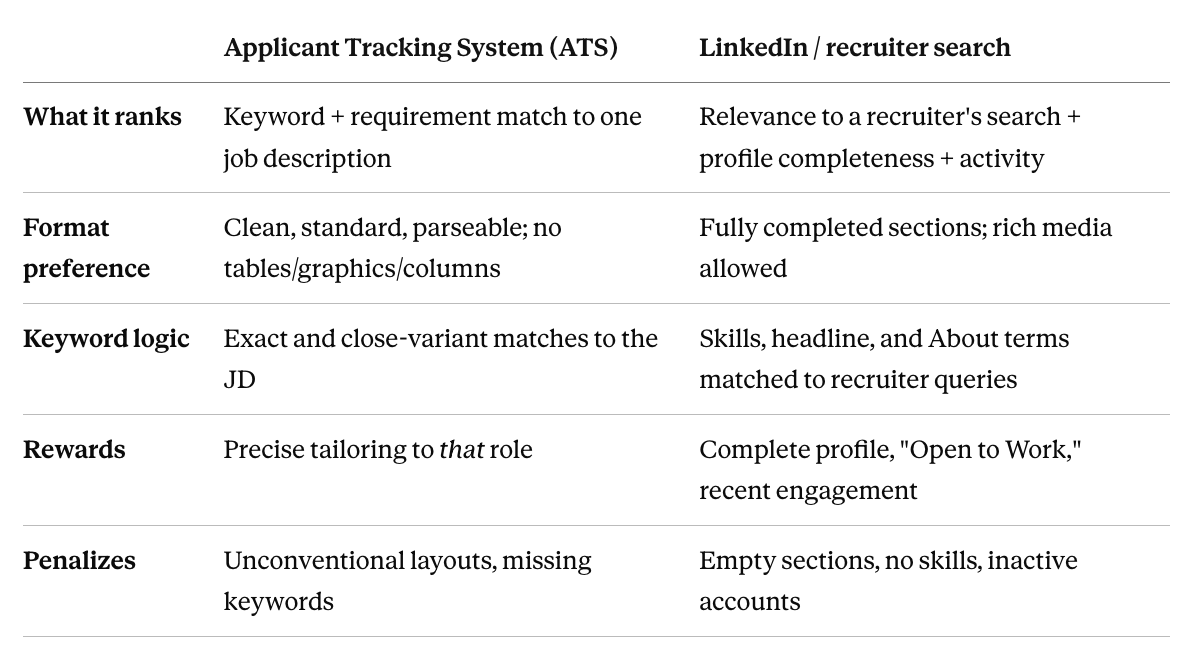
Practical takeaway: tailor the resume tightly to each job (keywords, format), and build the profile broadly for discoverability (complete every section, cover the full range of roles you'd accept).
The Alignment Audit: 7 Things That Must Match
Before optimizing anything, fix factual consistency. Open both documents side by side and confirm these match exactly:
- Job titles, word for word. "Sr. Marketing Manager" vs. "Senior Marketing Manager" counts as a mismatch to a skeptical reader.
- Employment dates, same months and years. This is the #1 thing recruiters flag.
- Company names, including any rebrands or acquisitions (note "(formerly X)" on both).
- Education, degree, institution, and dates identical.
- Certifications, present in both, with matching issue dates.
- Seniority signal, if your resume frames you as a leader, your profile shouldn't read as a junior doer (more on this below).
- Professional image/tone, a formal resume next to a casual, emoji-heavy profile creates dissonance.
If anything conflicts, fix the facts first. Optimization on top of inconsistent facts just makes the inconsistency more visible.
Translating Your Resume Into a LinkedIn Profile (Field by Field)
The mistake most people make is copy-pasting the resume into LinkedIn. The two formats reward different things. Here's how each resume element maps onto a profile.
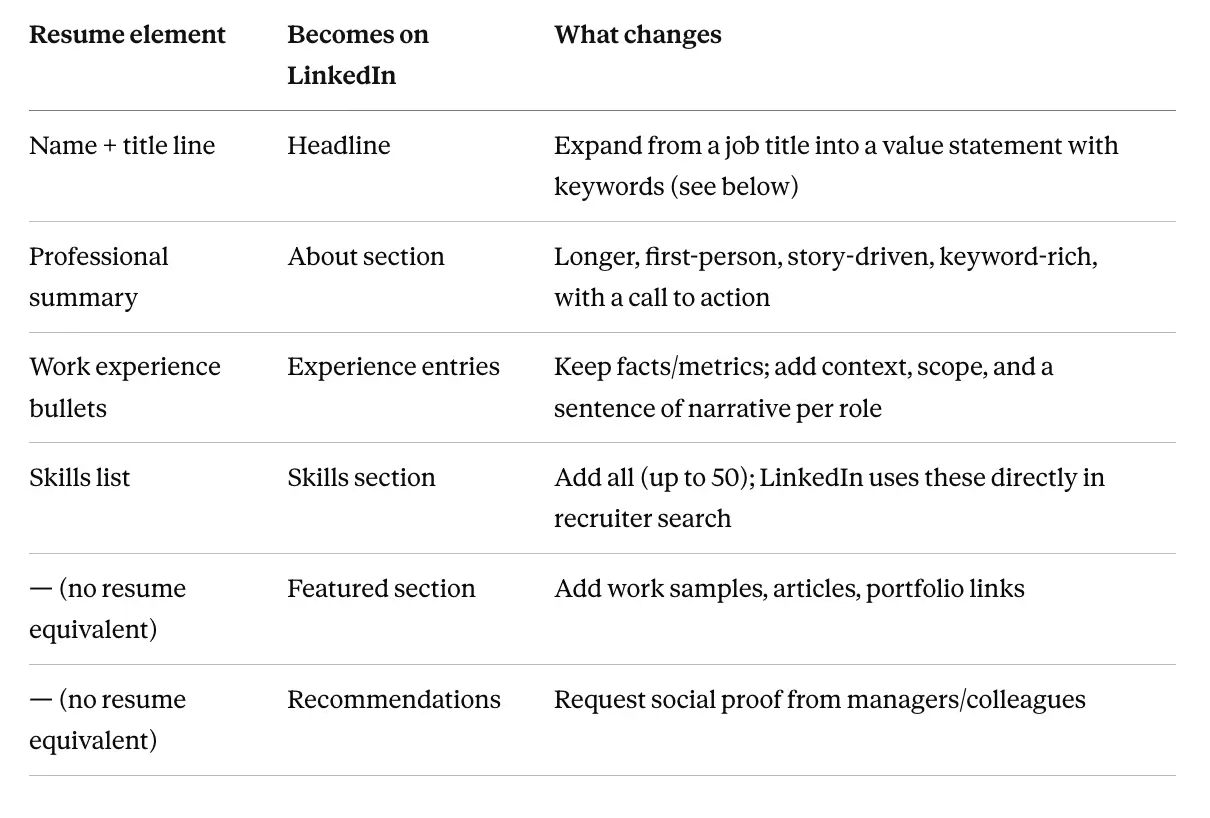
The principle: same truth, different depth. Your resume compresses; your profile expands.
Your LinkedIn Headline: Formula + Examples
Your headline is the single most-searched, most-seen line on your profile. Don't waste it on just your job title (LinkedIn defaults to that, most people never change it).
A strong formula:
[Role / what you do] | [Specialty or domain] | [Value, keyword, or outcome]
Before → After examples:
- Before: Marketing Manager at Acme → After: Marketing Manager | Demand Gen & Lifecycle | Helped scale ARR from $5M→$20M
- Before: Software Engineer → After: Senior Software Engineer | Backend & Distributed Systems | Python, Go, AWS
- Before: Student at University of Melbourne → After: Final-Year Data Science Student | Seeking Graduate Analyst Roles | Python, SQL, ML
Each "after" version does three jobs: states the role, packs in searchable keywords, and signals level and value, all within the ~220-character limit.
Your About Section: The Highest-Leverage Real Estate
The About section is where most profiles fall apart, they leave it blank or paste their resume summary. It's also one of the most heavily weighted areas in recruiter search. Structure it like this:
- Hook (1–2 lines): who you are and the value you create. Lead with impact, not "I am a passionate professional."
- Proof (2–4 lines): your strongest, quantified achievements, the same wins from your resume, written in first person with a little more context.
- Scope/keywords (2–3 lines): the domains, tools, and skills you want to be found for. This is where you deliberately seed recruiter-search terms naturally.
- Call to action (1 line): what you're open to and how to reach you.
Mini-example (opening):
I build demand-generation engines for B2B SaaS companies. Over the last six years I've helped two startups grow from sub-$5M to $20M+ ARR by rebuilding their lifecycle marketing, paid acquisition, and attribution from the ground up...
Write it in first person. LinkedIn is a social platform, third-person bios read as stiff and dated.
Keywords: Where They Go and How to Find Them
Keywords are how step 1 (recruiter search) finds you at all. Here's the concrete process most articles skip.
How to find them:
- Pull up 3–5 job descriptions for the roles you want.
- List the terms that repeat across all of them, skills, tools, methodologies, titles.
- Separate hard skills ("SQL," "P&L management," "Kubernetes") from soft/role terms ("stakeholder management," "team leadership").
Where to place them (in priority order):
- Headline, your highest-weight field. Fit 2–3 core terms.
- About, weave 6–10 terms in naturally across the section.
- Skills section, add every relevant one; recruiters filter directly on these.
- Experience entries, use the real terms in your role descriptions.
Rules: place them naturally (keyword-stuffed profiles read badly to humans and don't help with the algorithm), match the phrasing recruiters actually use, and skip empty buzzwords ("synergy," "go-getter") that no one searches for.
Showcasing Experience: Resume vs. LinkedIn
Same role, two treatments. The resume bullet is compressed; the LinkedIn version adds context the resume has no room for.
Resume bullet:
- Led marketing campaign that increased customer engagement 30%.
LinkedIn version:
- Led a six-month integrated campaign (paid, lifecycle, content) to re-engage lapsed users. Rebuilt the segmentation model, launched a 5-touch nurture sequence, and partnered with product on in-app messaging, lifting customer engagement 30% and recovering an estimated $1.2M in at-risk revenue.
Note what stayed (the 30% metric, it must match your resume) and what's added (scope, method, a second quantified outcome). The facts are consistent; the depth is greater.
The LinkedIn-Only Features Your Resume Can't Use
These have no resume equivalent and are pure upside for visibility and credibility:
- Featured section: pin work samples, case studies, portfolio pieces, published articles, or a personal site. This is the closest thing to a live portfolio on your profile.
- Recommendations: social proof a resume can't carry. To request one, send a specific ask, not a generic button-click:
Hi [Name], I'm refreshing my profile and would love a short recommendation focused on the [project] we worked on, especially the [specific result]. Happy to draft a few bullet points to make it easy if that helps."
- Skills & endorsements: add up to 50; pin your top 3 to the ones you most want to be found for. Recruiter search filters on these directly.
- "Open to Work": signals availability to recruiters specifically (you need to set it visible only to recruiters, not your network). It materially increases inbound.
- Activity: the algorithm favors active accounts. You don't need to be an influencer, occasional, relevant engagement is enough to keep your profile surfacing.
Staying Current Without Rewriting Everything
Alignment isn't a one-time task; it drifts the moment you change roles or learn a skill. Keep it low-effort:
- When you update one, update the other the same day. A new title or end date on your resume should hit LinkedIn immediately, this is where most mismatches originate.
- Add skills and certifications as you earn them, to both places.
- Refresh your headline and About when your target role shifts, not just when you change jobs.
- Quarterly 10-minute check: scan both for any factual drift in titles, dates, and skills.
Do It in Minutes With Seekario
Aligning two documents by hand is tedious, and the translation from resume to profile is exactly where people stall. Seekario removes that step.
Use the AI Resume Builder or AI Resume Tailor to get your resume right for the role you're targeting. Then the AI LinkedIn Profile Builder transforms that resume into a keyword-optimized profile, a ready-to-paste About section, expanded Experience entries, and a recommended Skills list, so your two most important documents finally tell one consistent, discoverable story.