How to Match Resume Skills to a Job Description (Step-by-Step)


You found a role that fits. You've got the experience. But your resume still isn't landing interviews — and the problem might be simpler than you think. Your skills don't mirror the language in the job description, so both the ATS and the recruiter skim right past you.
A 2025 study of over 4,200 resume reviews found recruiters spend an average of 11.2 seconds on an initial scan. In that window, they're pattern-matching: do the words on your resume look like the words in the job posting? If not, you're out. And before a human even sees your resume, ATS keyword filters screen for exact phrases from the posting — job-specific keywords drive 76% of those filters.
The fix isn't complicated. It's a repeatable, five-step process you can run every time you apply. This guide walks you through it with real job description examples, before-and-after rewrites, and a method you can finish in under 20 minutes.
Why Matching Skills to the Job Description Actually Matters
Tailoring your resume isn't about gaming the system. It's about communicating clearly. When a hiring manager writes a job description, they're telling you exactly what they need. When your resume echoes that language, you're confirming: "I have what you're looking for."
Here's what happens when your skills don't match:
The ATS filters you out. Most applicant tracking systems rank candidates by keyword relevance. If the posting asks for "data visualization" and your resume says "creating charts," the system may not connect the dots. Research shows 51% of resumes fail to reach the passing threshold on first submission — largely because of keyword gaps.
The recruiter moves on. Even when your resume reaches a human, that 11-second scan means the recruiter is looking for familiar terms. If they just read a JD asking for "stakeholder management" and your resume says "working with teams," you've made them do extra mental work. Most won't bother.
You undersell yourself. You might have every skill the role requires but describe them differently. Matching language forces you to translate your experience into terms the employer actually uses — which often makes your resume stronger, not weaker.
The good news: once you learn the extraction method, you can tailor any resume to any job description in about 15–20 minutes.
Step 1: Decode the Job Description
Every job description has a hierarchy. Not all requirements carry equal weight, and knowing how to read that hierarchy gives you an edge.
How to Read a JD Like a Recruiter
Start by copying the full job description into a separate document. Then break it into three zones:
Zone 1 — The opening paragraph. This describes the role's core purpose. Keywords here reveal the employer's top priorities. If the opening mentions "drive revenue growth through strategic partnerships," then revenue, strategic partnerships, and growth are your highest-priority terms.
Zone 2 — Responsibilities. These are listed roughly in order of importance. The first three bullets typically describe 60–70% of the actual job. Skills embedded in these bullets are must-haves.
Zone 3 — Qualifications. Watch for the split between "required" and "preferred." Required qualifications are non-negotiable keywords. Preferred ones are bonus points worth including if you have them.
What to Highlight
Go through the JD and highlight:
- Hard skills and tools — specific technologies, platforms, methodologies (e.g., "Salesforce," "Agile," "Python")
- Soft skills with context — not just "communication" but "cross-functional collaboration" or "executive presentations"
- Industry terms — jargon specific to the field (e.g., "pipeline management," "sprint velocity," "patient outcomes")
- Repeated phrases — anything mentioned more than once is a priority; the employer is emphasizing it deliberately
- Action verbs — the verbs in the responsibilities section tell you how they frame the work (e.g., "architect," "optimize," "scale")
Real Example: Marketing Manager JD Decoded
Here's a condensed job description with the keyword extraction applied:
Marketing Manager — B2B SaaS
We're looking for a Marketing Manager to lead demand generation efforts and drive pipeline growth for our enterprise product. You'll own the content strategy, manage a team of 3, and partner closely with Sales on account-based marketing (ABM) campaigns.
Responsibilities:
- Develop and execute multi-channel demand gen campaigns
- Build and optimize ABM playbooks targeting enterprise accounts
- Analyze campaign performance using HubSpot and Google Analytics
- Collaborate with Sales on lead scoring and pipeline reporting
Required: 5+ years B2B marketing, HubSpot experience, ABM strategy, SQL basics
Preferred: Marketo experience, Tableau, startup experience
Extracted priority keywords: demand generation, pipeline growth, content strategy, ABM, multi-channel campaigns, HubSpot, Google Analytics, lead scoring, pipeline reporting, SQL, B2B SaaS.

Step 2: Build Your Keyword Match List
Now that you've decoded the JD, create a simple comparison to see where you stand.
The Two-Column Method
Open a spreadsheet or even a notes app and create two columns:
Categorize Your Gaps
Once you've mapped everything, sort your gaps into three buckets:
- Language gaps — You have the skill but used different words. These are the easiest fixes. "Lead acquisition" becomes "demand generation." "Sales reports" becomes "pipeline reporting." Same experience, employer's vocabulary.
- Missing skills you actually have — SQL, a certification, a tool you used but didn't think to list. Add these.
- Genuine gaps — Skills you don't have. Don't fake these. Instead, look for adjacent experience. If they want Marketo and you've used HubSpot, you can mention HubSpot and note marketing automation platform experience. Transferable skills bridge smaller gaps without dishonesty.
This mapping takes 5–10 minutes and gives you a precise editing plan. No guessing about what to change.
If you want to speed this up, Seekario's AI Resume Tailor automatically extracts keywords from any job description and shows you exactly where your resume matches and where the gaps are — in seconds instead of minutes.
Step 3: Rewrite Your Skills Section
Your skills section is the most direct place to match the JD. Here's how to rebuild it for each application.
Prioritize by JD Order
List your skills in the order the JD emphasizes them. If "demand generation" appears in the opening paragraph and first responsibility, it goes at the top of your skills list — not buried after "Microsoft Office."
Use Exact Phrasing
ATS systems often look for exact string matches. Small differences matter:
Include both the spelled-out term and abbreviation when the JD uses both. "Account-based marketing (ABM)" covers you whether the ATS searches for the full phrase or the acronym.
Keep It Focused
Aim for 8–15 skills tailored to the specific role. Research shows resumes listing more than 20 skills face significantly higher rejection rates — a bloated skills section dilutes relevance. Every skill on your list should connect to something in the job description.
Before and After: Skills Section
Before (generic):
> Skills: Marketing, Social Media, Analytics, Leadership, Excel, Communication, Strategy, Problem Solving, CRM, Content
After (matched to the Marketing Manager JD above):
> Skills: Demand Generation, Account-Based Marketing (ABM), HubSpot, Content Strategy, Multi-Channel Campaigns, Google Analytics, Pipeline Reporting, Lead Scoring, SQL, Cross-Functional Team Leadership
Same person. Same experience. The "after" version speaks the employer's language.
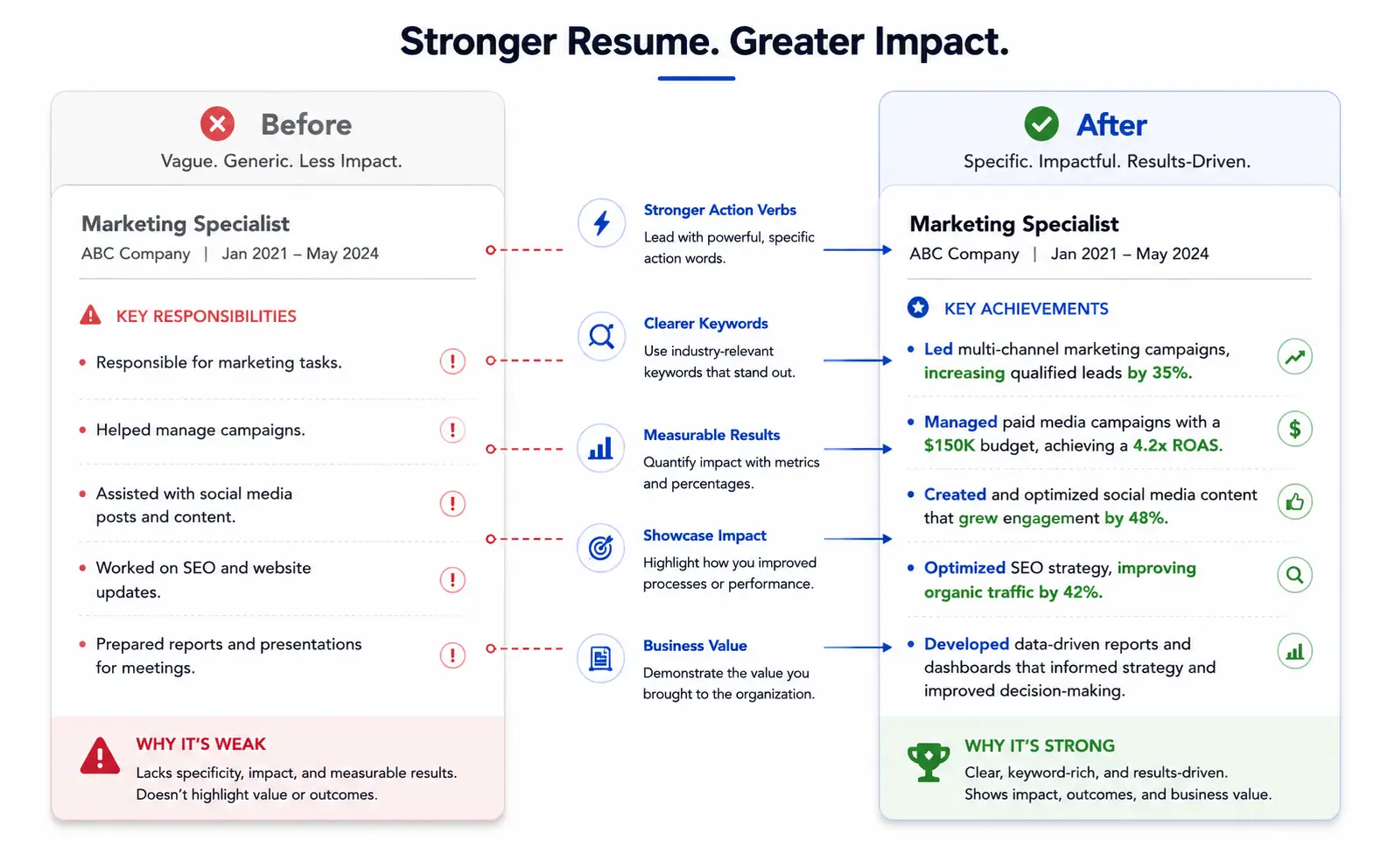
Step 4: Weave Keywords Into Your Experience Bullets
Your skills section gets the ATS match. Your experience bullets convince the human. Here's where most people stop — they update the skills list but leave their bullet points untouched. That creates a disconnect recruiters notice.
The Context + Keyword + Result Formula
For each bullet point, aim for this structure:
[Context] + [JD Keyword] + [Measurable Result]
This naturally embeds the keyword while proving you've actually used the skill.
Before and After: Experience Bullets
JD keyword: demand generation
- Before: "Managed marketing campaigns that brought in new leads"
- After: "Led multi-channel demand generation campaigns that drove 340 qualified leads per quarter, increasing pipeline by 28%"
JD keyword: account-based marketing (ABM)
- Before: "Created targeted campaigns for big accounts"
- After: "Built and executed ABM playbooks for 50+ enterprise accounts, resulting in 3.2x higher engagement rates versus broad-audience campaigns"
JD keyword: pipeline reporting
- Before: "Tracked sales numbers and made reports"
- After: "Owned weekly pipeline reporting in HubSpot, providing Sales leadership with conversion data that informed a revised lead scoring model"
JD keyword: cross-functional collaboration
- Before: "Worked with the sales team"
- After: "Partnered cross-functionally with Sales, Product, and Customer Success to align ABM messaging with product roadmap priorities"
Notice how each rewrite does three things: uses the exact JD phrase, adds specifics, and shows impact. You're not stuffing keywords — you're telling a better story using the employer's vocabulary.
Where to Place Keywords in Your Resume
Don't concentrate all your keywords in one section. Distribute them across:
- Professional summary — 2–3 of the highest-priority keywords woven into your opening statement
- Skills section — your complete keyword list, organized by priority
- Experience bullets — keywords embedded in achievement statements with metrics
- Certifications or projects — any relevant tool names or methodology terms
This distribution looks natural and gives ATS multiple touchpoints to register matches.
Step 5: Test Your Match Score
You've decoded the JD, built your keyword list, rewritten your skills section, and updated your bullets. Now verify the match before you hit submit.
Manual Check Method
Copy your updated resume text and the job description into two side-by-side windows. Go through each priority keyword and confirm it appears at least once — ideally twice — in your resume. Check that:
- Every "required" qualification keyword appears on your resume
- At least 70–80% of "preferred" qualification keywords are present (for ones you genuinely have)
- High-priority terms appear in more than one section
- Phrasing matches the JD exactly (not synonyms)
Common Mistakes That Kill Your Match Score
Even after tailoring, these errors can undermine your work:
Synonym substitution. You matched 90% of keywords but wrote "project management" when the JD said "program management." To an ATS, these may be different terms.
Keyword stuffing. Cramming every keyword into your summary or listing skills you can't back up in an interview. Recruiters spot this, and some ATS systems flag unnatural keyword density.
Ignoring the job title. The job title is one of the first things ATS searches for. If you're applying for "Senior Product Manager" and your resume says "Product Lead," add the exact title to your summary or a headline.
Formatting problems. Headers in text boxes, columns that confuse parsers, or PDFs that don't allow text extraction. Even perfect keyword matching fails if the ATS can't read your resume. Research shows parsing errors cause 23% of technical rejections.
One-and-done resumes. Using the same resume for every application. Each job description has different priorities and language. A resume tailored to one role might score poorly against a different posting — even for a similar position at a different company.
For a faster, more thorough check, Seekario's AI Resume Scanner scores your resume against any job description and flags exactly which keywords are missing, which sections need work, and how your resume compares to the role requirements.
Putting It All Together: A Complete Example
Let's walk through the full five-step process with a real-world scenario.
The role: Data Analyst at a fintech company
Key JD phrases extracted:
- SQL, Python, Tableau
- Financial data analysis
- Stakeholder presentations
- A/B testing
- Data pipeline management
- Cross-functional collaboration
- Risk modeling
The candidate's original resume summary:
> "Experienced analyst with 4 years of experience working with data. Skilled in Excel, SQL, and creating dashboards. Strong communicator who works well with teams."
After matching to the JD:
> "Data Analyst with 4 years of experience in financial data analysis for fintech and banking clients. Proficient in SQL, Python, and Tableau, with hands-on experience in A/B testing design, data pipeline management, and risk modeling. Known for translating complex findings into stakeholder presentations that drive business decisions."
The rewrite hits seven JD keywords naturally while reading as a coherent summary — not a keyword dump.
Frequently Asked Questions
How many keywords from the job description should I include on my resume?
There's no magic number, but aim to match every required qualification keyword and at least 70–80% of preferred ones (assuming you actually have those skills). For the skills section specifically, 8–15 tailored skills is the sweet spot. The goal is complete coverage of required terms without padding irrelevant ones.
Should I tailor my resume for every single job application?
Yes — if you're serious about the role. Each job description uses different language, even for similar positions. A resume tailored to "Marketing Manager" at one company might miss key terms for the same title at another. That said, you don't need to start from scratch each time. Keep a master resume with all your experience, then copy and customize it per application. The five-step process described here takes 15–20 minutes once you're practiced.
Is it dishonest to rewrite my resume to match a job description?
Not at all. Tailoring means translating your real experience into the employer's language — not fabricating skills you don't have. If the JD says "demand generation" and you did that work but called it "lead acquisition campaigns," changing the label is accurate communication, not deception. Never claim skills or experience you can't back up in an interview.
What if I'm missing several required skills from the job description?
If you're missing one or two required skills, apply anyway and highlight transferable experience. If you're missing more than half the required qualifications, the role may not be the right fit yet. Focus on positions where you match at least 70% of required skills. For genuine skill gaps, consider whether adjacent experience counts — using HubSpot when they ask for Marketo shows marketing automation proficiency, even if it's not an exact match.
Can AI tools help me match my resume to a job description faster?
Absolutely. Tools like Seekario's AI Resume Tailor automate the keyword extraction and matching process. You paste in the job description, upload your resume, and get specific recommendations for which skills to add, which phrases to rewrite, and where your gaps are. What takes 15–20 minutes manually can be done in under a minute. The key is still reviewing the output to make sure everything is accurate to your actual experience.
Match Your Skills, Land More Interviews
Matching your resume skills to the job description isn't a hack — it's how clear communication works. Employers tell you what they need in the JD. Your resume confirms you've got it, using their exact terms.
The five-step process — decode the JD, build your match list, rewrite your skills, update your bullets, and test your score — works for any role at any level. Each time you do it, you get faster. And the payoff is real: resumes that mirror the job description consistently score higher in ATS rankings and catch recruiters' attention during that critical first scan.
If you want to skip the manual work, Seekario's AI Resume Tailor handles the keyword extraction, matching, and rewriting automatically — so you can apply to more roles with better-matched resumes in less time.