How to Prepare for a Video Interview: Complete Checklist


You got the interview — congratulations. Now there's just one catch: it's on video. Maybe it's a live Zoom call with the hiring manager, a pre-recorded HireVue session, or even an AI-powered screening. Whatever the format, 90% of employers now use video interviews in early hiring stages, and 70% of job seekers expect virtual interview options as standard.
The good news? Video interviews give you more control over your environment than in-person meetings ever could. The bad news? Most candidates don't use that advantage. This checklist will make sure you do.
Know What Type of Video Interview You're Facing
Not all video interviews work the same way, and your prep strategy should change depending on the format.
Live video interviews are real-time conversations with a recruiter or hiring manager, typically lasting 30 to 60 minutes. These feel closest to an in-person meeting — you'll have back-and-forth dialogue, can ask questions, and need to think on your feet.
Pre-recorded (asynchronous) interviews present you with written or recorded questions, then give you a set window (usually 1–3 minutes per question) to record your answers. You'll often get one or two chances to re-record. Companies like HireVue and Spark Hire power many of these. The key challenge here is speaking naturally to a screen without any conversational feedback.
AI-powered interviews analyze your recorded responses using machine learning. These systems evaluate not just your words, but your tone, facial expressions, and body language. Only 26% of candidates trust AI to evaluate them fairly, so understanding how these work can calm your nerves.
Knowing your format ahead of time lets you practice the right way. Ask your recruiter which platform you'll be using, and whether the interview is live or recorded.
Set Up Your Technology (And Test It Twice)
Technical problems are the number one avoidable mistake in video interviews. Research shows that 62% of candidates experience some form of technical difficulty during virtual interviews — and 88% of recruiters say internet lag is their biggest pet peeve.
Here's your tech checklist for the day before:
- Internet connection: Use a wired ethernet connection if possible. If you're on Wi-Fi, sit close to the router and ask others in your household to avoid heavy streaming during your interview window.
- Camera and microphone: Test both using the platform's built-in check (Zoom, Teams, and Google Meet all have this). Your laptop's built-in camera is fine — you don't need a professional webcam.
- Software updates: Make sure your operating system and interview platform are fully updated. Nothing kills momentum like a forced restart.
- Battery and power: Plug in your laptop. Don't rely on battery alone.
- Backup plan: Have your phone charged and the interview app installed as a backup device. Save your interviewer's email so you can quickly communicate if something goes wrong.
Do a full dry run with a friend the day before. Have them give you honest feedback on your audio clarity, video quality, and how you look on screen.
Design Your Interview Environment
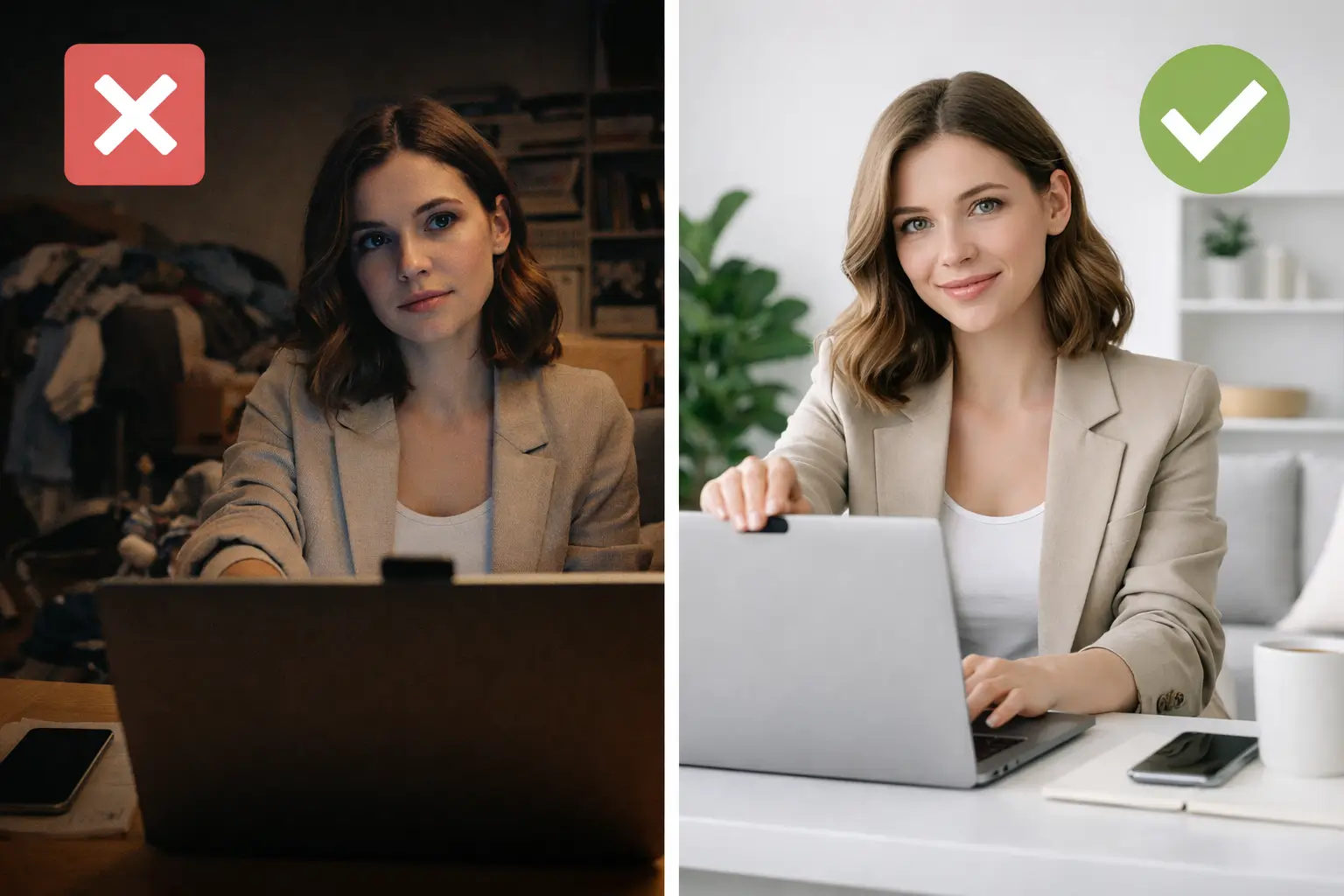
Your background and surroundings send a signal before you say a word. Recruiters — and especially AI systems — interpret messy or poorly lit settings as a lack of preparation.
Lighting matters most. Place your primary light source in front of you (behind your computer screen), not behind you. Natural light from a window works well, but avoid sitting directly in front of a window, which will turn you into a silhouette. If your room is dim, a simple desk lamp aimed at the wall behind your screen creates soft, flattering light. For what it's worth, 95% of recruiters prefer cool-toned light to warm light in video interviews.
Choose a clean, neutral background. A plain wall, a tidy bookshelf, or a simple home office setup all work. Remove anything distracting, personal, or controversial from the frame. If you can't find a clean background, most platforms offer virtual backgrounds — just make sure they don't glitch with your movements.
Eliminate noise. Close windows, turn off notifications on your phone and computer, and let anyone in your household know your interview time. Put pets in another room if possible. If you live in a noisy area, consider using headphones with a built-in microphone to reduce ambient sound.
Get Your Camera Position Right
Camera placement affects how you're perceived more than most people realize. The ideal position is at eye level or slightly above — roughly at the top of your head — angled slightly downward. This creates a natural, engaging perspective.
If you're using a laptop on a desk, the camera is probably too low, giving the interviewer an unflattering up-the-nose view. Stack some books under your laptop or use a laptop stand to raise it. Your eyes should be roughly in the upper third of the frame, with a small amount of space above your head.
Sit about an arm's length from the camera. Too close feels invasive; too far makes you look disengaged. You want your head, shoulders, and upper chest visible in the frame.
One critical habit to build: look at the camera lens when speaking, not at the interviewer's face on screen. This creates the illusion of direct eye contact. It feels unnatural at first, so practice during your dry run until it becomes second nature.
Dress the Part (Yes, the Full Part)
A quarter of recruiters say they'd dismiss a candidate based on inappropriate attire alone. Dress the same way you would for an in-person interview at that company. When in doubt, lean slightly more formal.
A few video-specific clothing tips:
- Wear solid colors. Busy patterns, thin stripes, and very bright colors can create a distracting moiré effect on camera.
- Avoid all-white or all-black. Both can confuse your camera's auto-exposure. A medium-toned solid color (navy, teal, charcoal, soft blue) works best.
- Dress completely. Yes, including pants and shoes. It affects your posture and confidence, and you never know when you might need to stand up unexpectedly.
- Skip noisy jewelry. Dangling earrings or bracelets can create distracting sounds, especially with sensitive microphones.
Prepare Your Answers (Without Scripting Them)
The biggest advantage of a video interview is that you can keep notes nearby. Use it wisely — but don't let it become a crutch.
Before the interview, review the job description and identify the top five skills or experiences they're looking for. Prepare a specific example for each one using the STAR method (Situation, Task, Action, Result). Write these as brief bullet points on sticky notes, and place them near your camera lens so your eyes don't drift noticeably when you glance at them.
Tools like Seekario's AI Interview Prep can generate practice questions based on the specific job description you're interviewing for. Practicing with targeted questions — rather than generic ones — helps you prepare answers that match what this particular employer is looking for.
Do not read from a script. Recruiters can tell immediately, and the left-to-right eye movement is obvious on camera. Your goal is to sound conversational and prepared, not rehearsed. Jot down key phrases, not full sentences.
For pre-recorded interviews, resist the urge to re-record obsessively. Your first or second take is usually the most natural. Short, focused answers (60–90 seconds per question) tend to perform better than long-winded responses.
Master Video-Specific Body Language
Body language on video is different from in-person. The camera flattens your expressions and limits what the interviewer can see, so you need to slightly amplify your natural communication style.
- Smile when greeting and closing. It sounds obvious, but many candidates forget to smile when they're nervous. A warm, genuine smile at the start sets a positive tone.
- Nod and react visibly. On video, subtle nods and facial reactions can get lost. Be slightly more expressive than you'd be in person to show you're actively listening.
- Use hand gestures sparingly. Keep your hands visible in the frame when gesturing, but don't wave them around constantly. Small, purposeful gestures add energy.
- Sit up straight. Good posture reads as confidence and engagement on camera. Avoid leaning back (looks too casual) or leaning too far forward (looks aggressive).
- Pause before answering. Especially in live interviews, a brief 1–2 second pause after the interviewer finishes speaking prevents you from talking over each other due to audio delay.
Handle Common Video Interview Curveballs
Things will go wrong sometimes. What matters is how you handle them.
Your internet drops. Rejoin immediately. If it takes more than 30 seconds, send a quick text or email: "I lost my connection — rejoining now." Don't apologize excessively when you're back. A brief "Sorry about that, technology!" is enough.
Background interruptions. A child walks in, a dog barks, a delivery person rings the bell. Acknowledge it briefly with a smile — "Excuse me one moment" — handle it, and move on. Most interviewers are understanding, and how you handle the disruption can actually demonstrate composure.
You blank on a question. Say "That's a great question — let me think about that for a moment." Take 5–10 seconds to collect your thoughts. Silence feels longer to you than it does to the interviewer.
The interviewer's video or audio is bad. Politely speak up: "I'm having a bit of trouble hearing you — could you repeat that?" It's better than nodding along and answering the wrong question.
Your Complete Video Interview Day-Of Checklist
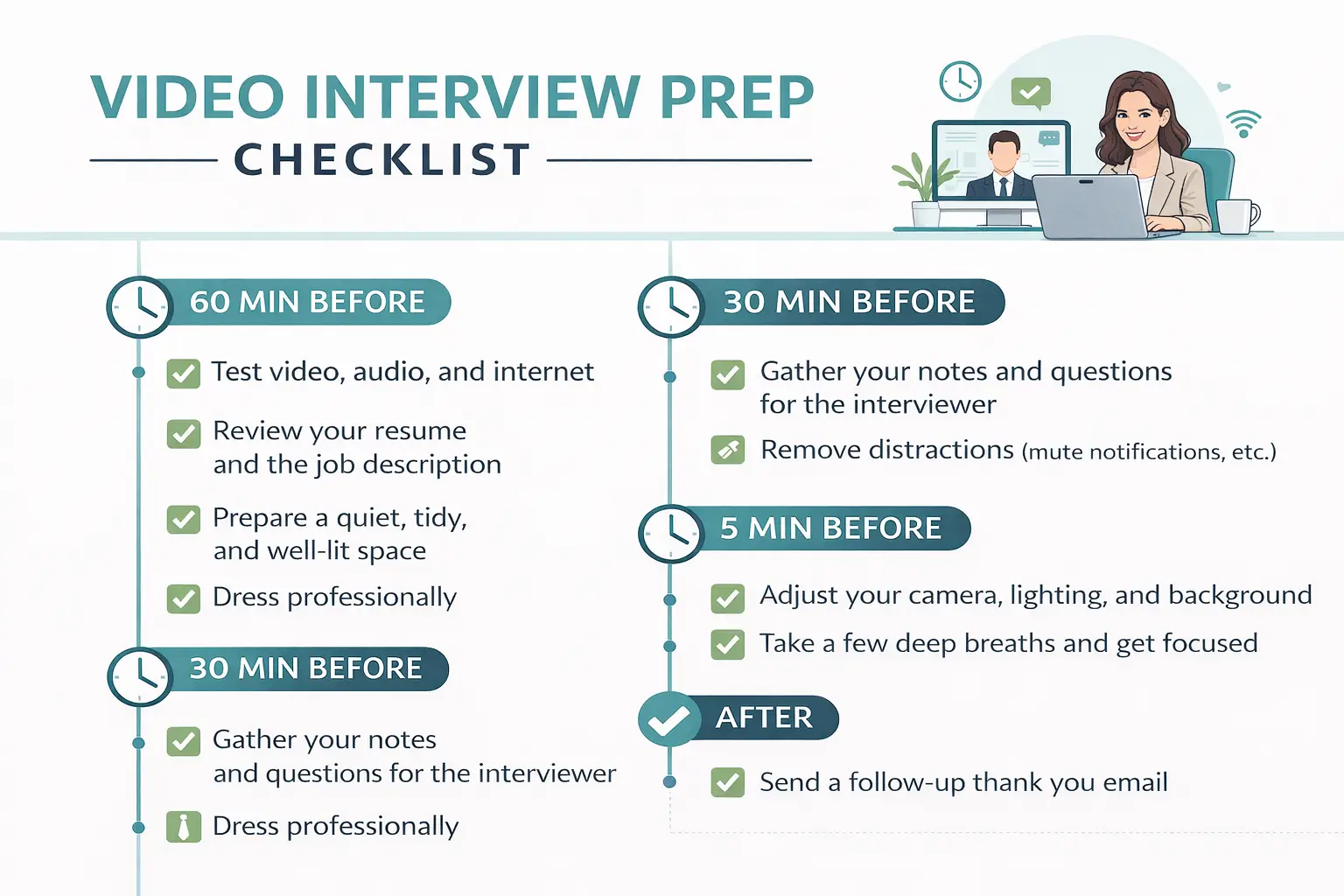
Use this checklist on interview day to make sure nothing slips through the cracks:
60 minutes before:
- Restart your computer to clear any background processes
- Close all unnecessary applications and browser tabs
- Silence your phone and turn off desktop notifications
- Set up your lighting and background
- Lay out your outfit and get dressed
30 minutes before:
- Open the interview platform and test audio/video
- Position your camera and check your framing
- Place your notes near the camera lens
- Fill a glass of water and keep it within reach (off-camera)
- Have a copy of your resume and the job description open on your screen (or printed)
5 minutes before:
- Join the meeting room or waiting area
- Take three deep breaths
- Smile at the camera — this is your first impression
After the interview:
- Send a follow-up thank-you email within 24 hours
- Note any questions you were asked for future reference
- Jot down the names and titles of everyone you spoke with
If you want to take your interview prep further, Seekario's AI Interview Prep tool generates role-specific practice questions and helps you refine your answers before the real thing.
FAQ
How early should I log into a video interview?
Log in 15 to 20 minutes before your scheduled time. This gives you a buffer to troubleshoot any last-minute technical issues with your camera, microphone, or internet connection. Most platforms let you test your setup in a waiting room before the interviewer joins.
Should I use a virtual background for my video interview?
Only if your real background is distracting or messy and you can't find a better location. Virtual backgrounds can glitch — especially with movement or hand gestures — which looks unprofessional. A clean, real background is always the safer choice. If you do use one, test it beforehand to make sure it renders smoothly.
Is it okay to have notes during a video interview?
Yes, and it's one of the best advantages of a video interview. Keep brief bullet points on sticky notes near your camera lens so you can glance at them without obviously looking away. Never read from a full script — interviewers can tell, and it makes your answers sound flat and rehearsed.
What should I do if my internet connection drops during a video interview?
Rejoin the call as quickly as possible. If you can't reconnect within 30 seconds, send the interviewer a brief email or text explaining the situation. Most interviewers are understanding about technical issues — what matters is that you communicate promptly and stay calm when you reconnect.
How do I prepare for an AI-powered video interview?
AI-powered interviews analyze your word choice, tone, facial expressions, and body language. Speak clearly and at a moderate pace. Maintain eye contact with the camera and use natural facial expressions. Structure your answers using the STAR method to stay organized. Practice with tools like Seekario's AI Interview Prep to get comfortable with the format before your actual interview.
Make Your Next Video Interview Your Best One
Video interviews aren't going anywhere. With 86% of organizations using virtual interview technology and AI-powered screenings becoming increasingly common, mastering this format is a career skill that pays dividends for years.
The candidates who stand out aren't necessarily the most qualified — they're the ones who prepared their environment, tested their tech, and practiced their delivery. That's a competitive advantage you can build in a single afternoon.
Ready to practice? Seekario's AI Interview Prep creates custom practice questions tailored to the exact role you're interviewing for, so you can walk into your video interview feeling prepared and confident.

.jpg)
