ATS-Friendly Resume: How to Beat the Bots and Get Interviewed


You spent hours perfecting your resume, hit "submit," and heard nothing back. Sound familiar? There's a good chance your resume never reached a human. About 98% of large companies use applicant tracking systems (ATS) to filter incoming applications, and research shows that roughly 75% of resumes get screened out before a recruiter ever sees them. If your resume isn't built to work with these systems, your qualifications won't matter.
This guide breaks down exactly how to create an ATS-friendly resume that clears automated screening and lands on a recruiter's desk, ready to impress.
What Is an ATS and Why Does It Matter?
An applicant tracking system is software that companies use to collect, organize, and rank job applications. When you submit your resume online, the ATS parses your document, extracts key information (your name, experience, skills, education), and scores how well you match the job description.
Here's why this matters: hiring managers at large companies can receive hundreds or even thousands of applications for a single opening. The ATS helps them narrow the pool by ranking candidates based on keyword matches, qualifications, and experience. If your resume doesn't parse correctly or lacks the right keywords, it gets buried at the bottom of the pile.
A study analyzing 1,000 rejected resumes found that 23% of rejections were caused by parsing errors alone. The ATS literally couldn't read the resume because of formatting issues like tables, columns, or graphics. That means nearly one in four qualified candidates got rejected for a problem that's entirely fixable.
How ATS Scanning Actually Works
Understanding the mechanics helps you write a better resume. Here's what happens after you click "apply":
- The ATS parses your document. It reads your resume file and tries to extract structured data: contact info, work history, education, and skills.
- It categorizes the information. Each piece of data gets slotted into predefined fields. Your job titles go into one bucket, your skills into another, your education into a third.
- It compares your resume to the job description. The system checks how many relevant keywords and qualifications from the posting appear in your resume.
- It assigns a score or ranking. Most ATS tools score resumes on a scale. Generally, a score of 80% or above means your resume gets forwarded to a recruiter.
- A recruiter reviews the top candidates. Only the highest-ranked resumes get human attention.
The takeaway? Your resume needs to be easy for the software to read AND rich with the right keywords. Miss either piece and you're out.
Formatting Rules for an ATS-Compatible Resume
Formatting is where most people unknowingly sabotage themselves. Here are the non-negotiable rules for an ATS-friendly resume.
Use a Simple, Single-Column Layout
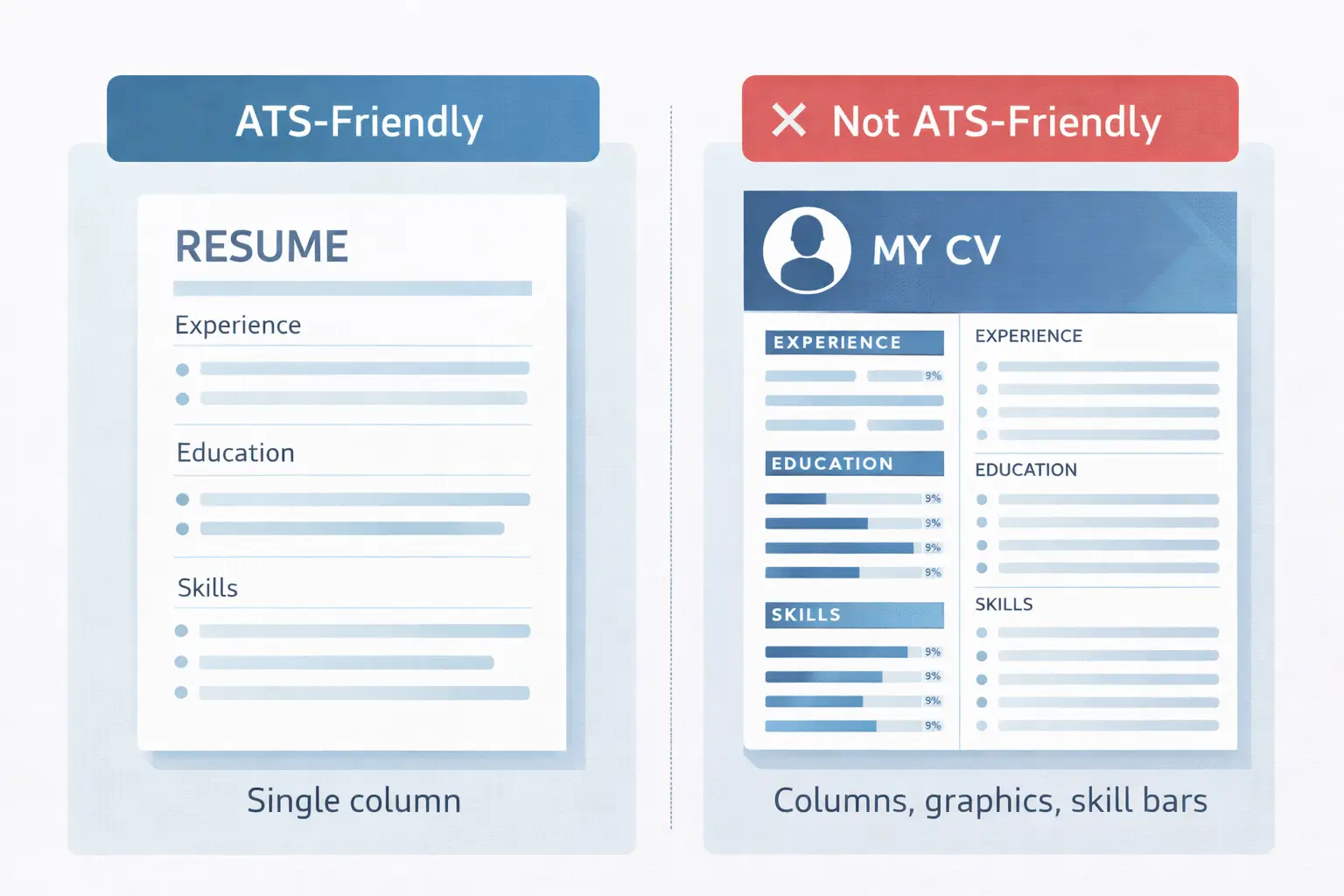
Tables, columns, text boxes, and sidebar layouts confuse ATS parsers. Many systems read content left to right, top to bottom. A two-column design can mix your work experience with your skills section, creating gibberish output. Stick to a straightforward single-column format.
Choose Standard Fonts
Use clean, widely supported fonts: Arial, Calibri, Garamond, Georgia, or Helvetica. Set body text to 11-12 points and section headers to 14-16 points. Decorative fonts may not render correctly and can cause parsing failures.
Use Standard Section Headings
ATS systems look for specific section labels. Use these exact headings:
- Professional Summary (or Resume Summary)
- Work Experience (or Professional Experience)
- Education
- Skills
- Certifications
Avoid creative alternatives like "My Journey," "What I Bring," or "Career Highlights." These sound unique, but the ATS won't know where to file that information.
Skip Graphics, Icons, and Images
Logos, headshot photos, skill bars, star ratings, and icons are invisible to most ATS software. They take up valuable space that could contain searchable text. Replace visual skill ratings with a simple skills list.
Keep Contact Info Out of Headers and Footers
Many ATS systems can't read content placed in document headers or footers. Put your name, email, phone number, and LinkedIn URL in the main body of the document, right at the top.
How to Optimize Your Resume Keywords for ATS
Keywords are the bridge between your resume and the job description. Here's how to get them right.
Mirror the Job Description
Read the job posting carefully and identify the specific terms used. If the description says "cross-functional collaboration," use that exact phrase in your resume rather than a synonym like "team coordination." ATS keyword matching is often literal, so precision matters.
Include Both Full Terms and Acronyms
Different ATS platforms search differently. Write out the full term on first use with the acronym in parentheses. For example: "Search Engine Optimization (SEO)" or "Project Management Professional (PMP)." This covers both search variations.
Add the Exact Job Title
If you're applying for a "Senior Marketing Manager" position, make sure that exact title appears somewhere in your resume, ideally in your professional summary or as a headline beneath your name.
Build a Dedicated Skills Section
Don't assume the ATS will extract skills from your bullet points. Create a separate skills section and list relevant technical skills, tools, software, certifications, and languages. Group them by category for added clarity:
- Technical Skills: Python, SQL, Tableau, Google Analytics
- Tools & Platforms: Salesforce, HubSpot, Jira, Slack
- Certifications: Google Analytics Certified, PMP, AWS Cloud Practitioner
If you're not sure which keywords to target, tools like Seekario's AI Resume Scanner can compare your resume against a job description and highlight missing keywords automatically.
Choose the Right Resume Format
The reverse-chronological format is the safest choice for ATS compatibility. It lists your most recent job first and works backward, which is exactly how ATS systems (and recruiters) expect to see your experience organized.
Functional resumes, which group experience by skill rather than by date, can confuse ATS parsers. The system may struggle to associate your achievements with specific employers and timeframes.
A hybrid format can work if you lead with a strong skills section followed by a chronological work history. But when in doubt, go chronological.
File Format: DOCX vs PDF
This debate comes up constantly. Here's the practical answer:
- .docx has the highest parsing success rate across ATS platforms. If the job posting doesn't specify a format, submit a Word document.
- .pdf is generally safe with modern ATS systems but can occasionally cause parsing issues, especially if the PDF was exported from a design tool like Canva.
- Never submit .jpg, .png, or other image formats. The ATS can't read them at all.
One more thing: don't trust Canva's "ATS-friendly" templates. They often use image-based layouts that look great on screen but are unreadable to parsing software. Build your resume in Word, Google Docs, or a verified ATS-compatible tool instead.
Tailor Your Resume for Every Application
A generic resume is an ATS score killer. Each job posting uses different keywords, emphasizes different skills, and prioritizes different qualifications. Your resume needs to reflect that.
Here's an efficient approach:
- Create a master resume with all your experience, skills, and achievements.
- For each application, pull the most relevant items from your master resume.
- Update your professional summary to match the specific role.
- Adjust your skills section to prioritize the keywords from the job description.
- Tweak 3-5 bullet points in your work experience to highlight the most relevant accomplishments.
This doesn't mean rewriting your entire resume from scratch for every job. It means making strategic adjustments that take 15-20 minutes per application. Seekario's AI Resume Tailor can speed this up significantly by automatically matching your experience to job descriptions and suggesting targeted changes.
Quantify Your Achievements
Numbers stand out to both ATS software and human recruiters. Compare these two bullet points:
- "Managed social media accounts and increased engagement" (vague)
- "Managed 4 social media accounts, increasing engagement by 67% and growing follower count from 12K to 45K in 8 months" (specific and measurable)
Aim to include metrics in at least 60-70% of your bullet points. Revenue generated, costs reduced, team size managed, projects delivered, percentage improvements — any quantifiable result strengthens your resume.
Format Dates Consistently
ATS systems extract dates to calculate your total experience and check for gaps. Inconsistent date formatting can cause parsing errors. Use the same format throughout your entire resume:
Recommended: March 2022 - June 2025
Avoid: Mar 2022, 03/22, 2022-2025, Q1 2022
Write out the full month name and use a four-digit year. Apply this format to every entry in your work experience, education, and certifications sections.
Test Your Resume Before Submitting
Don't guess whether your resume will pass an ATS scan. Test it. Several approaches work:
- Use an ATS scanning tool. Platforms like Seekario's AI Resume Scanner analyze your resume against specific job descriptions and flag formatting issues, missing keywords, and compatibility problems.
- Try the copy-paste test. Open your resume file, select all text, and paste it into a plain text editor like Notepad. If the text comes out jumbled, with sections out of order or missing content, the ATS will have the same problem.
- Check the parsing output. Some job application portals show you what the ATS extracted from your resume. Review this carefully and correct any errors before finalizing your submission.

Common ATS Mistakes to Avoid
Even small errors can tank your ATS score. Watch out for these frequent pitfalls:
- Keyword stuffing. Repeating the same keyword 15 times won't help. Modern ATS tools (and recruiters) flag this as spam. Use keywords naturally in context.
- Invisible text tricks. Some people paste keywords in white text, thinking only the ATS will see them. Most modern systems detect this, and it can get your application flagged or disqualified.
- Overly designed templates. Beautiful doesn't mean effective. If a template uses columns, text boxes, or graphics, it's likely ATS-hostile regardless of how polished it looks.
- Missing job titles. If your actual title was "Brand Ninja" but the role you're applying for is "Marketing Coordinator," include the standard industry title so the ATS can match it.
- Forgetting the basics. Spelling errors in key terms (writing "Pyton" instead of "Python") mean the ATS won't match that skill. Proofread carefully.
FAQ
What file format is best for an ATS-friendly resume?
A .docx (Microsoft Word) file has the highest compatibility rate across ATS platforms. Modern systems also handle standard PDFs well, but avoid PDFs exported from design tools like Canva, as they may use image-based layouts the ATS can't parse.
Can I use a resume template and still pass an ATS?
Yes, as long as the template uses a single-column layout, standard section headings, and no graphics, text boxes, or tables. Many free templates from Google Docs and Microsoft Word are ATS-compatible. Avoid templates from design platforms that prioritize visuals over structure.
How do I know which keywords to include in my resume?
Start with the job description. Highlight specific skills, tools, certifications, and qualifications mentioned in the posting. Use those exact terms in your resume. For a more thorough analysis, AI-powered tools can compare your resume to the job description and identify gaps.
Do I need a different resume for every job application?
You don't need to rewrite from scratch, but you should tailor your resume for each application. Update your summary, adjust your skills section, and modify a few bullet points to align with the specific job description. This targeted approach dramatically improves your ATS match rate.
What ATS score do I need to pass screening?
Most ATS platforms forward resumes that score 80% or higher to recruiters. However, this threshold varies by company and role. The higher your score, the better your chances of being reviewed.
Get Your Resume Past the Bots and Into Human Hands
An ATS-friendly resume isn't about gaming the system. It's about presenting your qualifications in a format that both software and humans can read and appreciate. Clean formatting, targeted keywords, quantified achievements, and consistent structure are what separate the resumes that get interviews from the ones that disappear into the void.
If you want to skip the guesswork, Seekario's AI Resume Builder creates ATS-optimized resumes from the ground up, while the AI Resume Scanner tool scores your existing resume against any job description and tells you exactly what to fix. Try it free and see how your resume stacks up.