How to Write a Professional Email for a Job Application


Your resume might be flawless. Your cover letter might tell a compelling story. But if the email carrying those attachments feels rushed, generic, or sloppy, a hiring manager may never open them. The job application email is your first handshake — and recruiters form an opinion within seconds of reading it.
Whether you're responding to a job posting, emailing a recruiter directly, or following up on a referral, the email you send alongside your resume matters more than most candidates realize. According to hiring data, recruiters spend an average of 6 to 8 seconds scanning an application before deciding to move forward or move on. That means your email needs to earn attention fast.
This guide walks you through every element of a strong job application email — from the subject line to the sign-off — with templates you can adapt for any role.
Why Your Job Application Email Matters
Most job seekers pour effort into their resume and cover letter but treat the email itself as an afterthought. That's a missed opportunity. Your job application email is the first piece of writing a recruiter reads from you. It sets the tone for everything that follows.
A strong application email does three things. It tells the recruiter exactly why you're writing. It shows you've done your homework on the role. And it makes opening your attachments feel like a natural next step — not a chore.
On the other hand, a vague or overly long email signals low effort. If a recruiter has 200 applications to sort through, the ones with clear, professional emails get priority.
The Anatomy of a Perfect Job Application Email
Every effective job application email follows a predictable structure. Here's what to include and how to get each part right.
Subject Line
The subject line determines whether your email gets opened or buried. Keep it straightforward, searchable, and specific.
Best format: `[Job Title] Application – [Your Full Name]`
Examples:
- Marketing Manager Application – Sarah Chen
- Software Engineer (Job ID #4421) – James Rivera
- Application: Senior Data Analyst – Priya Kapoor
Avoid subject lines that are vague ("Job Application"), overly creative ("Your Next Star Hire!"), or missing your name entirely. Recruiters often search their inbox by job title or candidate name — make it easy for them to find you.
Greeting
Address the hiring manager by name whenever possible. Check the job posting, the company's team page, or LinkedIn to find the right person.
- If you know the name: Dear Ms. Patel, / Dear Dr. Okafor,
- If you don't: Dear Hiring Manager, / Dear [Department Name] Recruiting Team,
Avoid "To Whom It May Concern" — it reads as outdated and impersonal.
Opening Paragraph
State the position you're applying for, where you found the listing, and one compelling reason you're a strong fit. This paragraph should be two to three sentences, max.
Example: "I'm writing to apply for the Product Designer position posted on your careers page. With five years of experience designing B2B SaaS interfaces and a portfolio that includes work for three Fortune 500 clients, I'm excited about the opportunity to bring that experience to your design team."
Body Paragraph
This is where you connect your background to the role. Pick one or two specific achievements that match the job requirements and briefly describe them. Use numbers when you can — percentages, revenue figures, team sizes, or project outcomes.
Example: "At my current role with TechStart, I led a redesign that improved user onboarding completion by 34% and reduced support tickets by 20% within three months. I'm particularly drawn to your team's focus on accessibility-first design, which aligns with my own approach."
Keep this section to three or four sentences. You're not rewriting your cover letter — you're giving the recruiter a reason to read it.
Closing and Call to Action
Express gratitude, restate your interest, and make it easy for them to take the next step.
Example: "I've attached my resume and cover letter for your review. I'd welcome the chance to discuss how my experience aligns with your goals. I'm available for a call at your convenience — please don't hesitate to reach out."
Professional Sign-Off
End with a clean signature block:
```
Best regards,
Sarah Chen
(555) 234-5678
sarah.chen@email.com
linkedin.com/in/sarahchen
```
Use sign-offs like "Best regards," "Sincerely," or "Kind regards." Skip casual closings like "Cheers" or "Thanks!" unless the company culture is explicitly informal.
Job Application Email Template You Can Use Today
Here's a ready-to-customize template:
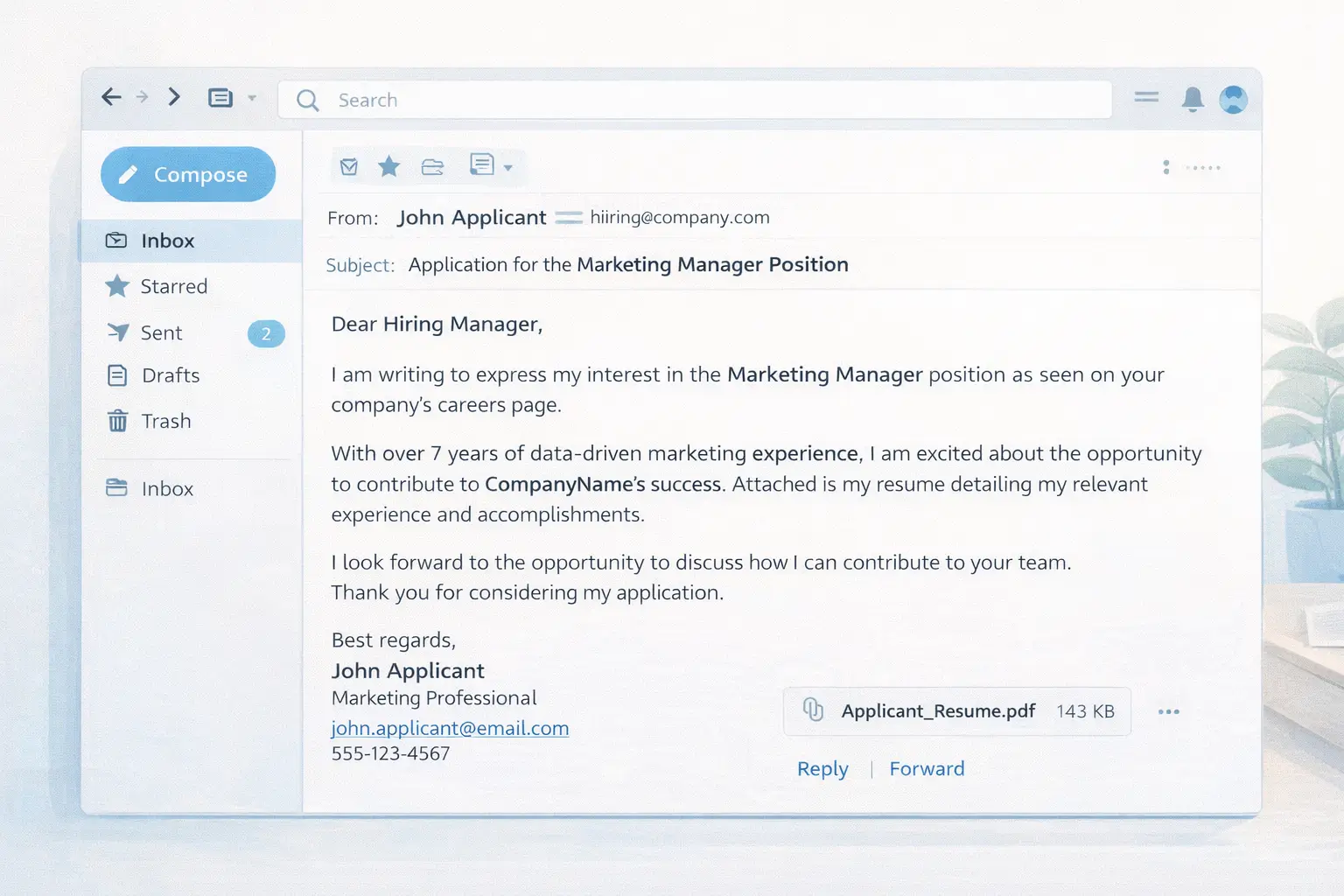
Subject: [Job Title] Application – [Your Full Name]
Email:
Dear [Hiring Manager's Name],
I'm writing to apply for the [Job Title] position at [Company Name], which I found on [Job Board/Source]. With [X years] of experience in [relevant field], I'm excited about the opportunity to contribute to your team.
In my current role at [Current Company], I [specific achievement with a measurable result]. I'm drawn to [Company Name] because [specific reason tied to company mission, product, or values].
I've attached my resume and cover letter for your review. I'd love the opportunity to discuss how my background aligns with this role. Please feel free to reach out at your convenience.
Best regards,
[Your Full Name]
[Phone Number]
[Email Address]
[LinkedIn URL]
5 Mistakes That Sink Job Application Emails
Even small errors can cost you an interview. Here are the most common mistakes to avoid.
- Using an unprofessional email address. Addresses like "partyguy99@email.com" or "cutiepie_jess@email.com" undermine your credibility instantly. Create a professional address using your first and last name.
- Sending a wall of text. Your email should be 100 to 150 words in the body — three short paragraphs at most. The details belong in your resume and cover letter, not the email itself.
- Forgetting to attach your documents. It happens more often than you'd think. Always double-check your attachments before hitting send. Better yet, send a test email to yourself first.
- Copy-pasting the same email for every job. Recruiters can tell when an application is generic. Reference the specific company name, role, and at least one detail that shows you've researched the position.
- Skipping the subject line or writing a vague one. Emails with unclear subject lines get lost. Always include the job title and your name.
How to Tailor Your Email to Different Scenarios
Not every job application email follows the same formula. Here's how to adjust for common situations.
Applying Through a Job Board
If you're applying through LinkedIn, Indeed, or another job board, you may still need to send a follow-up email directly to the hiring manager. In your email, mention where you submitted your application and briefly restate your interest.
Emailing After a Referral
Referral emails should lead with the connection. Start with something like: "James Rivera from your engineering team suggested I reach out regarding the open Backend Developer position." Referrals carry weight — use them prominently.
Cold Emailing a Company
When there's no posted opening, adjust your tone. Instead of applying for a specific role, express interest in the company and ask whether there are upcoming opportunities in your area. Keep it short and make your value proposition clear in one sentence.
Following Up on an Application
If you haven't heard back after one to two weeks, send a brief follow-up. Reference the date you applied, express continued interest, and keep the tone polite — not pushy.
How AI Can Help You Write Better Application Emails
Writing a tailored email for every job application takes time — especially when you're applying to multiple roles each week. This is where AI tools can speed up the process without sacrificing quality.
An AI networking tool can help you draft personalized email content that matches the tone and keywords of a specific job description. Instead of starting from scratch each time, you get a draft that's already aligned with what the recruiter is looking for.
Pair that with an AI resume tailor to make sure the resume you're attaching is customized for the role too. When your email, cover letter, and resume all speak the same language as the job posting, you dramatically increase your chances of making it past both ATS filters and human reviewers.
Pre-Send Checklist
Before you hit send, run through this quick checklist:
- Subject line includes the job title and your name
- Recipient is correct (double-check spelling of their name)
- Greeting is professional and addressed to a specific person when possible
- Body is under 150 words and mentions the specific role
- Attachments are included, named professionally (e.g., "Sarah_Chen_Resume.pdf"), and saved as PDFs
- Email address you're sending from looks professional
- Spelling and grammar have been checked — read the email out loud if it helps
- Signature includes your full name, phone number, and LinkedIn
FAQ
How long should a job application email be?
Keep it between 100 and 150 words in the body. The email is an introduction, not a cover letter. Include just enough to state the role you're applying for, highlight one or two relevant qualifications, and invite the recruiter to review your attached documents.
Should I include my cover letter in the email body or as an attachment?
Attach it as a separate PDF unless the job posting specifically asks you to paste it in the email. Attaching it keeps your email concise and makes it easier for the hiring manager to save and share your materials.
What's the best email format for sending a resume?
Use PDF format for both your resume and cover letter. PDFs preserve formatting across all devices and email clients, and they look professional. Name the files clearly — something like "FirstName_LastName_Resume.pdf" works well.
Is it okay to follow up if I don't hear back?
Yes, following up is expected and professional. Wait one to two weeks after your initial email, then send a short note reaffirming your interest. Keep it to two or three sentences and avoid sounding frustrated or impatient.
Should I use AI to write my job application email?
AI tools are great for generating a strong first draft and making sure you hit the right keywords. The key is to personalize the output — add specific details about the company and role, adjust the tone to sound like you, and proofread carefully. Tools like Seekario's AI networking tools can save significant time while keeping your emails tailored and professional.
Send Emails That Open Doors
A well-crafted job application email takes five minutes to write but can be the difference between getting an interview and getting ignored. Focus on clarity, specificity, and professionalism. Tailor every message to the role. And make sure the resume you attach is just as polished as the email carrying it.
If you want to streamline the process, Seekario's AI-powered tools can help you generate customized application emails, cover letters, and tailored resumes in minutes — so you spend less time formatting and more time landing interviews.